.png)
Is there a way I can update an attendee's SSO data in my organization?
Note: the Admin Attendee Management feature must be enabled for your organization to access this feature. Only Admin Event Users can use this feature when active
If your organization has the 'Admin Attendee Management' feature enabled, you can easily amend the attendees SSO data we have stored in our database. You may need this in situations such as their SSO credentials have changed post-registration (eg email address or SSO ID changes) and they are having issues with accessing their registration in getregistered®. You can also use this feature to edit 'Event Password' scoped attendees if required, attendees with a 'Global Password' scope cannot be edited here.
To access the 'Admin Attendee Management' feature, click on your user avatar (top right of the page) and select the 'Manage Attendees' option. This is available on all pages in the application:
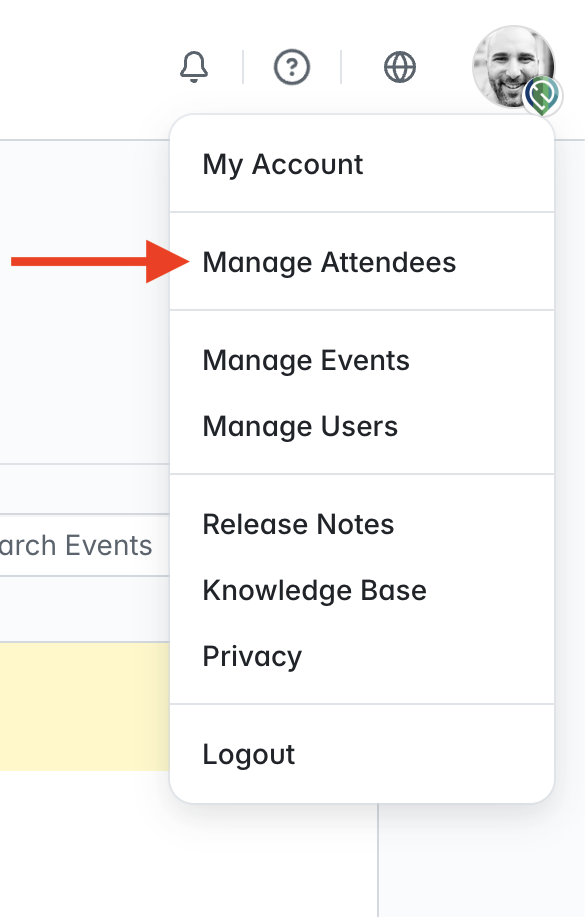
Now you should be in your organization's Admin Attendee Management area, where you will see a list of all attendees registered for events in your organization. You can search and filter attendees as required using the filter options displayed each column (where present):

To view or begin editing an attendee, click on the 3 dots displayed at the end of the attendee's row:

If you choose to 'Edit', you will see something similar to the screenshot below:

- Email - the current email address we have in our database for the selected attendee
- First Name/Last Name - the current first and last names we have in our database for the selected attendee. Please note that the name stored is for the attendee's 'Profile', and changing this here will not change any names they have used when registering with an event.
- External ID - this field is only shown when the attendee has registered via SSO. This will either be a numerical/alpha-numerical ID or an email address
To make your changes, simply amend the fields you need to address and then click 'Save Attendee'. You will then be returned to the main Admin Attendee Management area, and the changes will be applied to the selected attendee.